

- 3
- 1,903 word
Remote work has evolved from a temporary trend into a permanent business model. Over the last decade, I’ve worked with distributed teams across startups, SaaS companies, content agencies, and digital businesses, and one thing has become incredibly clear — productivity depends heavily on the tools you use.
In the early days of remote collaboration, teams relied on endless Zoom calls, messy spreadsheets, scattered notes, and constant Slack notifications. Productivity suffered because people spent more time organizing work than actually doing it. Today, the rise of the best AI productivity apps has completely transformed how remote teams operate.
Modern AI tools for remote work now automate scheduling, summarize meetings, generate content, prioritize tasks, improve communication, and even predict workflow bottlenecks before they happen. What once required multiple employees can now be streamlined through intelligent automation.
Personally, I noticed the biggest shift after integrating AI-powered workflow systems into remote projects. Meetings became shorter, deadlines improved, communication became clearer, and team burnout reduced significantly. The best part is that these tools don’t replace human creativity they remove repetitive tasks so teams can focus on meaningful work.
This guide explores the best AI apps for work productivity in 2026, based on practical experience, real-world testing, and productivity performance in remote work environments.
Why AI Productivity Apps Are Essential for Remote Work
Remote work creates flexibility, but it also introduces major productivity challenges:
- Communication gaps
- Task management confusion
- Time zone coordination
- Meeting overload
- Workflow inefficiencies
- Lack of accountability
This is where remote work AI software becomes essential.
AI productivity platforms help teams centralize operations, automate repetitive work, and improve decision-making. Instead of manually managing every process, AI systems intelligently assist teams in real time.
For example, one remote marketing team I worked with reduced internal meetings by nearly 40% after implementing AI-generated meeting summaries and automated project updates. Employees regained hours every week.
Some major benefits of using AI productivity tools for teams include:
Improved Time Management
AI scheduling tools automatically organize calendars, prioritize tasks, and suggest focus periods.
Faster Communication
AI writing assistants improve emails, messages, reports, and collaboration notes instantly.
Better Project Visibility
AI-powered dashboards provide real-time insights into project progress and team workloads.
Reduced Burnout
Automation removes repetitive administrative tasks, helping employees focus on high-value work.

How AI Tools Improve Team Collaboration and Workflow Efficiency
The biggest advantage of modern ai tools for remote work is workflow optimization.
Traditional collaboration tools only stored information. AI-powered systems actively assist users by understanding priorities, deadlines, communication patterns, and work habits.
Here’s how AI is improving remote collaboration in real-world business environments:
AI Meeting Summaries
Tools like Otter AI and Fireflies AI automatically transcribe conversations, highlight action items, and generate summaries.
This eliminates manual note-taking completely.
Smart Task Prioritization
AI project management software analyzes deadlines, workloads, and dependencies to recommend task priorities.
Automated Content Creation
AI writing tools generate reports, emails, marketing copy, and documentation in seconds.
Intelligent Scheduling
AI scheduling assistants organize meetings across multiple time zones automatically.
Workflow Automation
Routine tasks like reminders, follow-ups, updates, and approvals can now run autonomously.
In my experience, companies using integrated remote work ai software often outperform traditional teams because employees spend less time switching between tools.
Best AI Productivity Apps for Remote Work in 2026
Notion AI
Notion AI is one of the most powerful knowledge management and collaboration platforms available today.
It combines note-taking, documentation, project management, and AI writing assistance inside one workspace.
Key Features
- AI-generated summaries
- Smart writing assistance
- Task organization
- Collaborative workspaces
- Knowledge management
Real Use Cases
I’ve personally used Notion AI for managing editorial workflows, client onboarding systems, and remote documentation.
Instead of searching through dozens of folders, AI instantly retrieves information and summarizes projects.
Productivity Benefits
- Reduces documentation time
- Improves internal collaboration
- Centralizes team knowledge
Pros
- Extremely flexible
- Excellent collaboration tools
- Great for startups and agencies
Cons
- Learning curve for beginners
- Advanced setups can become complex
Best Use Scenario
Perfect for distributed teams managing multiple projects simultaneously.
ChatGPT
ChatGPT has become one of the most essential best ai apps for work productivity for remote professionals.
From content generation to brainstorming and coding assistance, it dramatically speeds up daily workflows.
Key Features
- AI writing assistance
- Research support
- Coding help
- Workflow automation ideas
- Meeting preparation
Real Use Cases
I regularly use ChatGPT for:
- Drafting proposals
- Summarizing reports
- Creating SOPs
- Automating repetitive communication
Productivity Benefits
- Saves hours weekly
- Improves content quality
- Speeds decision-making
Pros
- Extremely versatile
- Easy to use
- Excellent for solo professionals and teams
Cons
- Requires fact-checking
- Advanced features require subscription
Best Use Scenario
Ideal for freelancers, agencies, marketers, developers, and remote managers.
ClickUp AI
ClickUp combines project management with intelligent AI automation.
Key Features
- AI task generation
- Workflow automation
- Project tracking
- Team collaboration
Personal Experience
One remote development team I worked with reduced project delays significantly after implementing ClickUp AI automation.
Pros
- Powerful automation
- Excellent team visibility
Cons
- Interface can feel overwhelming initially
Best Use Scenario
Best for project-heavy remote teams.
Grammarly AI
Grammarly remains essential for remote communication.
Key Features
- Grammar correction
- Tone improvement
- AI writing suggestions
- Business communication optimization
Real Use Cases
Remote teams heavily depend on written communication. Grammarly reduces misunderstandings dramatically.
Best Use Scenario
Excellent for remote customer support, content teams, and managers.
Slack AI
Slack now integrates AI-powered productivity features.
AI Features
- Conversation summaries
- Smart search
- AI-generated updates
Productivity Benefits
Remote teams avoid information overload and quickly catch up on missed conversations.
Motion
Motion focuses on intelligent scheduling and time management.
Key Benefits
- AI calendar optimization
- Task prioritization
- Automatic scheduling
I personally found Motion extremely useful during high-pressure project deadlines.
Otter AI
Otter.ai transforms meetings into searchable notes and summaries.
Key Benefits
- Real-time transcription
- Meeting summaries
- Action item extraction
Remote meetings become far more productive with automatic documentation.
Fireflies AI
Fireflies.ai is another excellent meeting intelligence platform.
Best Features
- Meeting recording
- AI-generated summaries
- CRM integrations
Great for sales teams and client management.
Trello AI
Trello integrates lightweight AI productivity features into task management.
Best For
Small remote teams and freelancers who want simplicity.
Asana AI
Asana continues to improve enterprise-level workflow automation.
AI Features
- Smart reporting
- Automated updates
- Task prioritization
Excellent for larger distributed organizations.
External Link Suggestion: Asana AI

Comparison Table of Best AI Productivity Apps
| Tool Name | Best For | Pricing | AI Features | Team Collaboration | Ease of Use |
|---|---|---|---|---|---|
| Notion AI | Documentation & workflows | Freemium | AI writing & summaries | Excellent | Moderate |
| ChatGPT | Content & automation | Freemium | Conversational AI | Strong | Easy |
| ClickUp AI | Project management | Paid plans | Workflow automation | Excellent | Moderate |
| Grammarly AI | Writing assistance | Freemium | Grammar & tone AI | Good | Very Easy |
| Slack AI | Communication | Paid | AI summaries | Excellent | Easy |
| Motion | Scheduling | Paid | AI calendar management | Moderate | Easy |
| Otter AI | Meetings | Freemium | AI transcription | Strong | Easy |
| Fireflies AI | Meeting intelligence | Freemium | AI meeting summaries | Strong | Easy |
| Trello AI | Lightweight task management | Freemium | AI task support | Good | Very Easy |
| Asana AI | Enterprise workflow management | Paid | Smart automation | Excellent | Moderate |
How AI Productivity Tools Are Changing Remote Teams
The impact of ai productivity tools for teams goes beyond convenience.
AI is fundamentally changing workplace culture.
Automation Reduces Repetitive Work
Employees now spend less time on:
- Manual reporting
- Scheduling
- Status updates
- Data entry
AI Scheduling Improves Focus
Smart scheduling systems create uninterrupted deep-work sessions.
Smart Meeting Summaries Save Hours
AI-generated notes eliminate unnecessary follow-up meetings.
AI Writing Assistants Improve Communication
Clear communication becomes critical in remote environments.
Workflow Automation Increases Scalability
Startups can now operate efficiently with smaller teams.
One major trend I’ve observed is that businesses adopting best ai productivity apps early gain a significant competitive advantage.
Common Mistakes Businesses Make While Using AI Productivity Tools
Many companies adopt AI tools incorrectly.
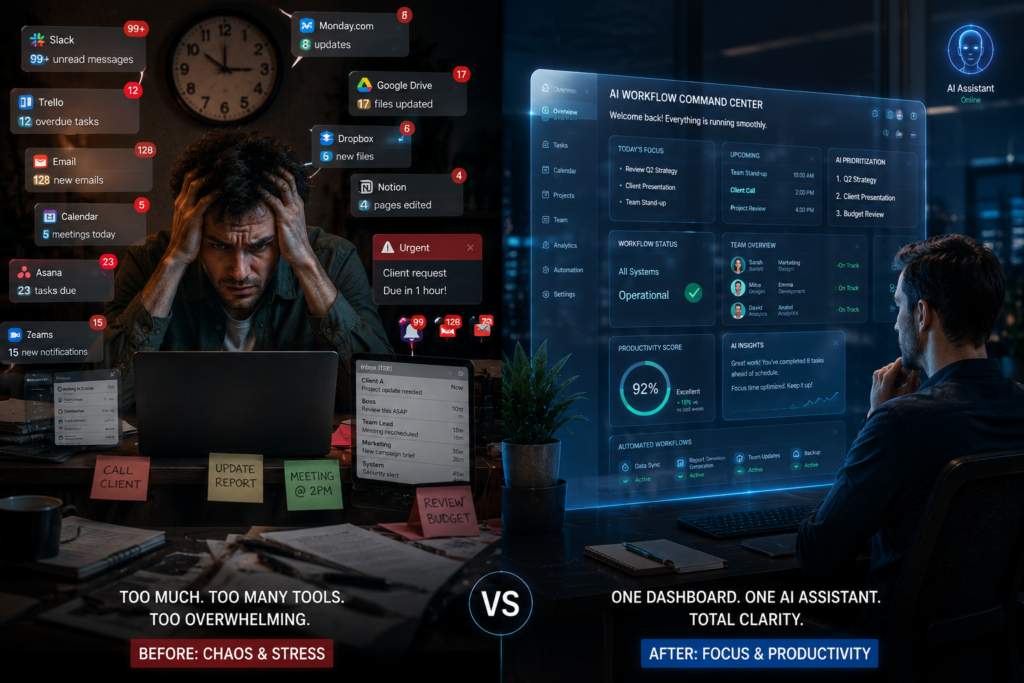
Using Too Many Tools
Overloading teams with multiple disconnected platforms creates confusion.
Ignoring Employee Training
AI tools are only effective when employees understand how to use them properly.
Automating Everything
Not every workflow should be automated. Human creativity and decision-making still matter.
Choosing Features Over Workflow Fit
The best tool is the one that integrates naturally into your existing workflow.
Best Practices for Choosing AI Tools for Remote Work
When evaluating remote work ai software, I recommend focusing on:
Workflow Compatibility
Choose tools that integrate with your existing systems.
Ease of Adoption
Complex platforms often reduce team adoption rates.
Automation Capabilities
The best AI tools remove repetitive work.
Collaboration Features
Prioritize real-time communication and shared workflows.
Scalability
Select platforms that can grow with your business.
A practical tip: always test AI tools with a small team before company-wide deployment.
Future of AI Productivity Apps in Remote Work
The future of remote productivity looks incredibly AI-driven.
AI Agents
Autonomous AI assistants will soon manage workflows independently.
Predictive Productivity Systems
AI will predict delays, burnout risks, and resource shortages before they happen.
Autonomous Workflows
Entire project pipelines may become partially self-operating.
AI-Powered Virtual Assistants
Future assistants will coordinate meetings, tasks, communication, and reporting automatically.
Smarter Remote Collaboration
AI will improve virtual collaboration through real-time translation, emotional tone analysis, and contextual recommendations.
Businesses investing early in the best ai apps for work productivity will likely dominate remote-first industries over the next decade.

Conclusion
AI is no longer just an experimental technology for remote teams — it has become a core productivity infrastructure.
The rise of the best ai productivity apps is transforming how businesses communicate, collaborate, manage projects, and scale operations globally. From intelligent scheduling to AI-generated meeting summaries and automated workflows, modern teams are saving enormous amounts of time while improving efficiency.
After years of testing various ai tools for remote work, one thing stands out clearly: the companies that combine human creativity with AI-powered productivity systems consistently outperform traditional workflows.
The future of remote work will belong to organizations that embrace intelligent automation without losing the human side of collaboration.
If you’re building a remote-first business in 2026, investing in the right ai productivity tools for teams is no longer optional — it’s a competitive necessity.
FAQs Section
What are the best AI productivity apps for remote work?
Some of the best AI productivity apps include Notion AI, ChatGPT, ClickUp AI, Grammarly AI, Slack AI, Motion, Otter AI, Fireflies AI, Trello AI, and Asana AI.
Which AI tools are best for remote team collaboration?
Slack AI, ClickUp AI, Asana AI, and Notion AI are excellent for collaboration and workflow management.
Are AI productivity tools worth it for small businesses?
Yes. AI productivity tools help small businesses automate repetitive work, improve communication, and increase operational efficiency.
Can AI improve remote work communication?
Absolutely. AI writing assistants, meeting transcription tools, and smart summaries significantly improve communication clarity.
What is the future of AI in remote work?
The future includes AI agents, autonomous workflows, predictive productivity systems, and smarter virtual collaboration environments.
Author

razamohd1203@gmail.com
Related Posts
Best AI Apps for iPhone in 2026: Top AI Assistants, Productivity & Automation Apps
- 0
- 1,701 word
Artificial intelligence has completely transformed the way we use our iPhones. What started with simple voice commands has evolved into powerful AI...
AI Tools for Teachers: 10 Smart Platforms Transforming Education in 2026
- 0
- 1,785 word
Artificial intelligence has moved far beyond being a futuristic concept in education. Over the past decade and a half, I have worked...
AI Voice Cloning Software 2026: My Real-World Tests Revealed the Most Human-Sounding AI Voices
- 0
- 1,458 word
Twenty-five years ago, creating a professional voice-over required a recording studio, expensive microphones, skilled voice actors, and hours of editing. Today, a...

Future of Artificial Intelligence: How AI Will Change Everyday Life in 2026
- 2
- 1,412 word
The future of artificial intelligence is no longer a distant concept I used to write about a decade ago as “coming soon.”...

Free AI Video Generator for YouTube Creators: Best Tools 2026
- 0
- 1,395 word
The way YouTube content is created has completely changed in the last few years. What used to take hours of scripting, filming,...

AI Automation for Businesses: How AI is Changing Operations in 2026
- 3
- 1,809 word
In 2026, businesses are no longer asking whether they should adopt AI. The real question is how fast they can implement it...
3 comments